

Staying organized in today’s digital world feels harder than ever. Every day begins the same way you open your laptop, launch your browser, and start clicking through tabs. Email. Google. YouTube. Notes. Weather. Tasks. Before you realize it, your screen is full of distractions.
This is exactly what happened to a freelance designer who struggled to stay focused while working remotely. His day started with good intentions, but within minutes, he was lost between multiple tabs.
Everything changed when he discovered the power of a productivity dashboard
Instead of jumping between websites, he turned his browser into a centralized workspace using a smart new tab extension That single shift helped him stay organized, reduce distractions, and regain control of his time.
Here’s how you can do the same.
Understand What a Productivity Dashboard Really Is.
A productivity dashboard is more than just a digital tool; it’s a centralized control panel for your daily online activity.
Think of it as your command center.
Instead of opening separate tabs for search, tasks, notes, bookmarks, and time tracking, a dashboard organizes everything in one place. When powered by a new tab extension it replaces your default blank screen with a customized workspace.
This means every time you open a new tab, you see tools that help you work, not distractions.
A modern internet homepage should not be empty. It should serve a purpose. It should help you stay aligned with your goals.
Turn Your New Tab into a Smart Internet Homepage.
Most people underestimate the power of their browser’s new tab.
On average, we open dozens of new tabs daily. That blank page is valuable digital real estate. Why waste it?
Ali realized that instead of seeing a blank search page, he could transform it into a smart internet homepage using CentPage.
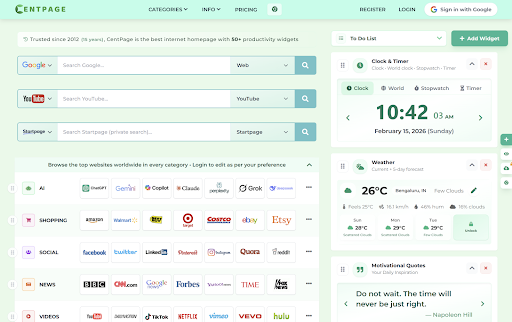
CentPage is designed to convert your default tab into a fully customizable productivity dashboard. It combines multiple tools, search options, widgets, and visual bookmarks into one clean interface.
Rather than adapting to your browser, your browser adapts to you.
From there, you’ll see how it centralizes your workflow without overwhelming you.
Use Widgets to Reduce Mental Clutter.
One reason people lose focus is mental overload. When tasks are scattered across different apps, your brain constantly switches contexts.
A structured dashboard solves this problem.
With CentPage’s new tab extension, you can access:
- To do lists
- Clock and timer
- Weather updates
- Notes
- Multiple search engines
- Visual bookmarks
Imagine opening a new tab and immediately seeing your top priorities for the day. No extra clicks. No switching apps.
Ali started using the built in timer widget to work in focused 25-minute sessions. His productivity improved within days.
Small improvements in organization create big changes in focus.
Centralize Search and Save Time.
Another major distraction is switching between search engines.
Sometimes you search Google. Other times, YouTube. Sometimes a privacy focused engine. Each one opens a new page.
A smart productivity dashboard integrates multi search functionality directly into your internet homepage.
With CentPage, you can perform web searches, video searches, and other queries directly from your customized tab.
This reduces unnecessary navigation and saves valuable time throughout the day.
If you’re using Chrome, you can install the CentPage Chrome extension from the Chrome Web Store and instantly activate your upgraded workspace.
Once installed, every new tab becomes intentional not accidental.
Organize Bookmarks Visually for Faster Access.
Traditional bookmarks quickly become messy.
Folders within folders. Long lists. Hard to find links.
A visual layout makes a difference.
CentPage allows you to categorize and rearrange your frequently visited sites directly on your dashboard. Instead of scrolling through cluttered lists, you access your favorite tools in seconds.
Ali organized his workflow into categories:
- Design tools
- Client communication
- Research
- Inspiration
Now, everything he needs is visible and structured.
That’s the power of a well designed new tab extension that reduces friction in your daily routine.
Learn from Community Feedback and Continuous Improvement.
When choosing a tool to manage your workflow, credibility matters.
CentPage has gained attention for its approach to turning a basic browser tab into a dynamic productivity dashboard The tool has been featured on platforms like Product Hunt, where users explore and review innovative digital solutions.
You can check community discussions and feedback through CentPage on X (Twitter))to see how others are using it to improve their organization and focus.
Seeing how real users integrate the dashboard into their daily routine can inspire new productivity strategies.
How a Productivity Dashboard Changes Your Daily Routine.
After using a smart internet homepage, Ali noticed three key changes:
He started his day with clarity instead of chaos.
He reduced time wasted on unnecessary clicks.
He felt more in control of his workflow.
The difference wasn’t dramatic at first but it was consistent.
A blank tab invites distraction.
A structured dashboard invites action.
When your browser becomes a focused workspace instead of a gateway to endless scrolling, your mindset shifts.
Final Thoughts.
Staying organized in a digital first world requires intentional tools. A well designed Productivity dashboard can help you stay focused, manage tasks efficiently, and reduce unnecessary distractions.
Instead of accepting a blank default tab, upgrade it.
Turn your browser into a powerful internet homepage with a reliable new tab extension like CentPage. Explore the features on the official CentPage website, install the Chrome extension, and see how a small change in your browsing environment can produce meaningful improvements in your daily productivity.
The tools you use shape the way you work.
Watch the official CentPage promo video
https://www.youtube.com/watch?v=7Jzyk9Pm0sk